

Work an incident to closure
The five stages of the incident response process, what each one asks you for, when to move on, and what closing an incident properly requires.
Audience: ISMS Admin.
Before this: Incidents and concerns covers how something is reported and what happens automatically. This page is about the part that is yours: working the incident from the moment it lands to the moment you close it.
Open any incident and you will see a bar across the top with five stages. That bar is the process, and it is the thing an auditor reads when they ask how you responded. This page explains what each stage is for and what it wants from you.

The five stages at a glance
Section titled “The five stages at a glance”| Stage | The question it answers | What it asks for |
|---|---|---|
| Detection | What happened, and when? | Incident title, date it occurred, date reported, description |
| Triage | How bad is it, and what kind? | Status, classification, severity, who reported it |
| Containment | Have we stopped it getting worse? | Containment actions, whether the ICO was notified |
| Recovery | Are we back to normal? | Status set to Resolved |
| Review | What did we learn? | Lessons learned, root cause, ICO reference |
Moving between stages. Open the stage on the bar and use Next stage. Nothing is locked: you can go back, and you should when new information arrives. Moving forward is a statement that the previous stage is genuinely finished, so do not advance to keep the bar looking tidy.
Stage 1. Detection
Section titled “Stage 1. Detection”Record what happened and when it happened, in plain language, in the title.
Two dates matter and they are usually not the same. The date it occurred is when the thing actually happened. The date it was reported is when you found out. The gap between them is one of the most useful numbers in your ISMS: an organisation that hears about problems weeks later has a reporting culture problem, whatever its controls say.
The description is your account of the incident: what you know, when you knew it, and what you have already done about it. Write it now, while it is fresh, and correct it before you close. The description written in the first hour is rarely the one an auditor should read.
If the incident arrived from a staff concern on your SharePoint site, Certaria has already filled in the title, the description, the classification it inferred from the category the reporter chose, and a link back to the original report. Read the original report before you triage. The category a worried person picks in thirty seconds is a starting point, not a diagnosis.
Stage 2. Triage
Section titled “Stage 2. Triage”This is the stage that decides everything downstream, and it maps to what ISO 27001 calls assessment and decision (A.5.25).
Classification is what kind of incident it is: a data breach, unauthorised access, malware, phishing, a physical incident, a service disruption, or something else. Correct it if the inferred value is wrong. The classification drives what you have to do next, most obviously whether personal data is involved.
Severity drives the alerting, so set it honestly. High severity and above sends an email and a Teams message the moment you save, and records that it did. Below that, nothing is sent. Setting a genuinely serious incident to Medium to avoid the noise is the failure mode that gets found at audit.
The reporter is who told you. Where the incident came from a concern, this is already resolved to the person who submitted it.
Stage 3. Containment
Section titled “Stage 3. Containment”What did you do to stop it getting worse? Write it down as you go, not afterwards. Suspended an account, isolated a laptop, blocked a sender, forced a password reset, told a supplier to stop processing. Times matter here more than prose.
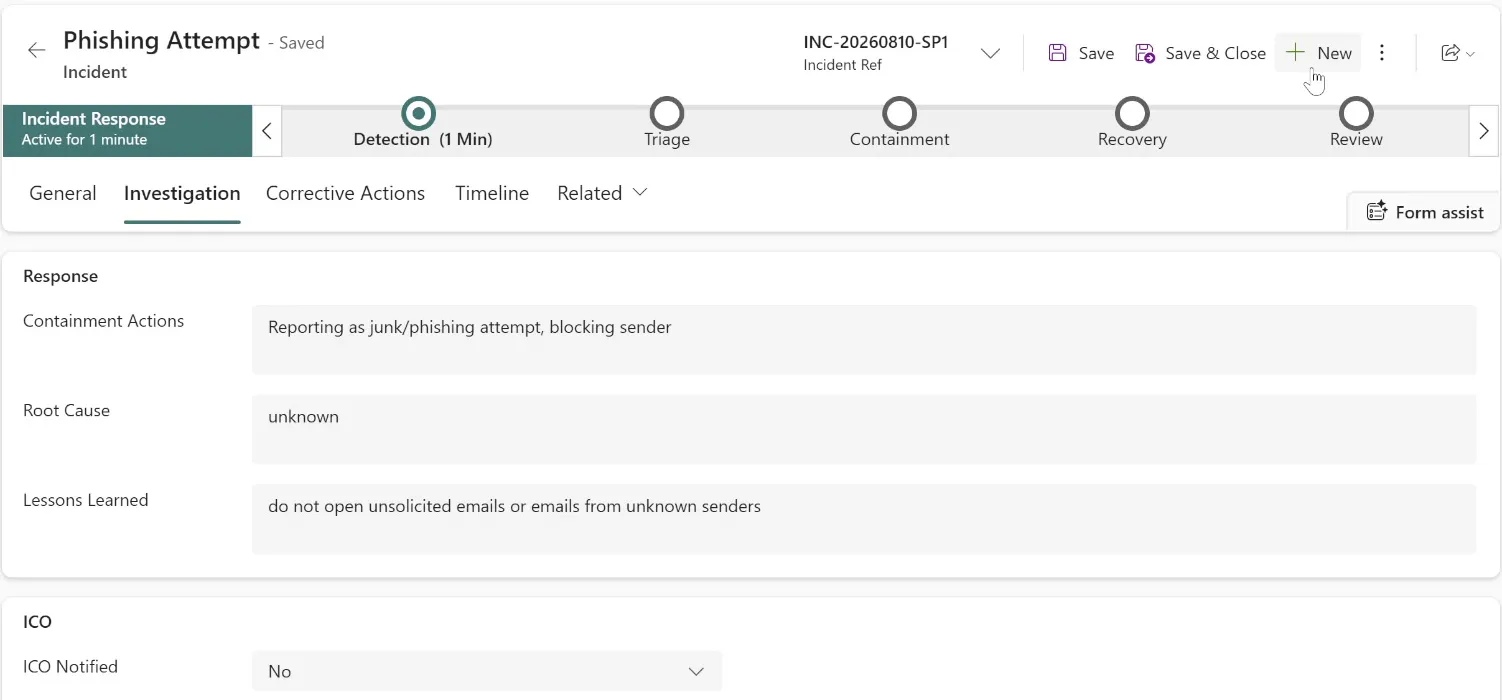
ICO notified is a yes or no, and both answers are legitimate. A decision not to notify is a decision you are entitled to make and required to be able to justify, so record why in the containment notes. An empty field is the answer that fails, because it reads as never having considered the question.
Stage 4. Recovery
Section titled “Stage 4. Recovery”Recovery is the return to normal service.
This stage asks for one thing: set the status to Resolved. That is a statement about the world rather than bookkeeping, so make it deliberately.
Before leaving this stage, ask the two questions that decide whether recovery is real: is the affected service actually back to normal, and is the original cause actually gone? Restoring a mailbox while the compromised password is still in use is not recovery.
Stage 5. Review
Section titled “Stage 5. Review”This is the stage that makes the incident worth something, and the one people skip.
Reaching Review opens a corrective action automatically, so the lesson is captured as a piece of work with an owner and a due date rather than a paragraph nobody reads again. It appears under Corrective Actions and is chased like any other task.
Lessons learned should answer what you would change, not what went wrong. “Staff clicked a phishing link” is a description. “Our phishing training does not cover supplier invoice fraud, and we are adding it in September” is a lesson.
ICO reference is where you record the reference number if you notified. It is the evidence that the notification happened, and it is the first thing asked for if the ICO comes back to you.
Root cause is asked for at this stage, and also sits on the Investigation tab. Write what actually caused it, and write “unknown” if that is the truth: an honest unknown is a finding an auditor can work with, and a guess dressed as a cause is not.
Closing an incident
Section titled “Closing an incident”Set the status to Closed when, and only when:
- Containment and recovery are genuinely complete.
- The review stage has been reached, so a corrective action exists.
- Lessons learned says something a stranger could act on.
- Where personal data was involved, the notification decision is recorded either way.
Closing an incident does not close its corrective action, and it should not. The lesson usually outlives the incident, and an auditor is more interested in whether the corrective action completed than in how quickly the incident was shut.
What an auditor asks, and where the answer is
Section titled “What an auditor asks, and where the answer is”| Question | Where it is answered |
|---|---|
| How do people report things? | The concern route on your SharePoint site |
| How quickly did you know? | The gap between date occurred and date reported |
| Who decided how serious it was? | Triage: classification and severity, and who set them |
| What did you do about it? | Containment actions, with times |
| Did you consider the ICO? | The ICO notified field and the reason recorded with it |
| What changed as a result? | The corrective action opened at Review, and whether it closed |
| Can you show it working end to end? | One closed incident, walked from Detection to a completed corrective action |
Related controls
Section titled “Related controls”- A.5.24 Information security incident management planning and preparation
- A.5.25 Assessment and decision on information security events (Triage)
- A.5.26 Response to information security incidents (Containment and Recovery)
- A.5.27 Learning from information security incidents (Review, and the corrective action)
- A.5.28 Collection of evidence (the record itself, and anything attached to the original report)
- Incidents and concerns, for how reports arrive and what alerts automatically
- Tasks and deadlines, which chase the corrective action Review opens
- The risk register, because a repeated incident is usually a risk you have not recorded