

Your first thirty days
An ordered path from installing Certaria to a working evidence rhythm, so you know what to do next rather than facing a pile of reference.
Audience: the person who will administer the ISMS. Usually one person in an organisation of this size.
What this is: an order of work, not a reference. Each step names the guide that covers it in full.
Before you start
Section titled “Before you start”You need three things in place:
- Microsoft 365 Business Premium or higher for your organisation.
- A Power Apps licence for each ISMS administrator. Power Apps Premium (per user), Pay-As-You-Go or Per App all work. Microsoft took Per App off its public price list on 2 January 2026, so if you want it, buy it through a Microsoft CSP partner. Only administrators need one. Everyone else uses Certaria through SharePoint and Microsoft Teams, and needs nothing beyond your existing Microsoft 365 subscription.
- A Global Administrator available for two approvals, both one off: the install itself, and the Microsoft Graph consent.
Everything you need to certify is in the core subscription. The two add-ons are genuinely optional and neither is needed to reach certification.
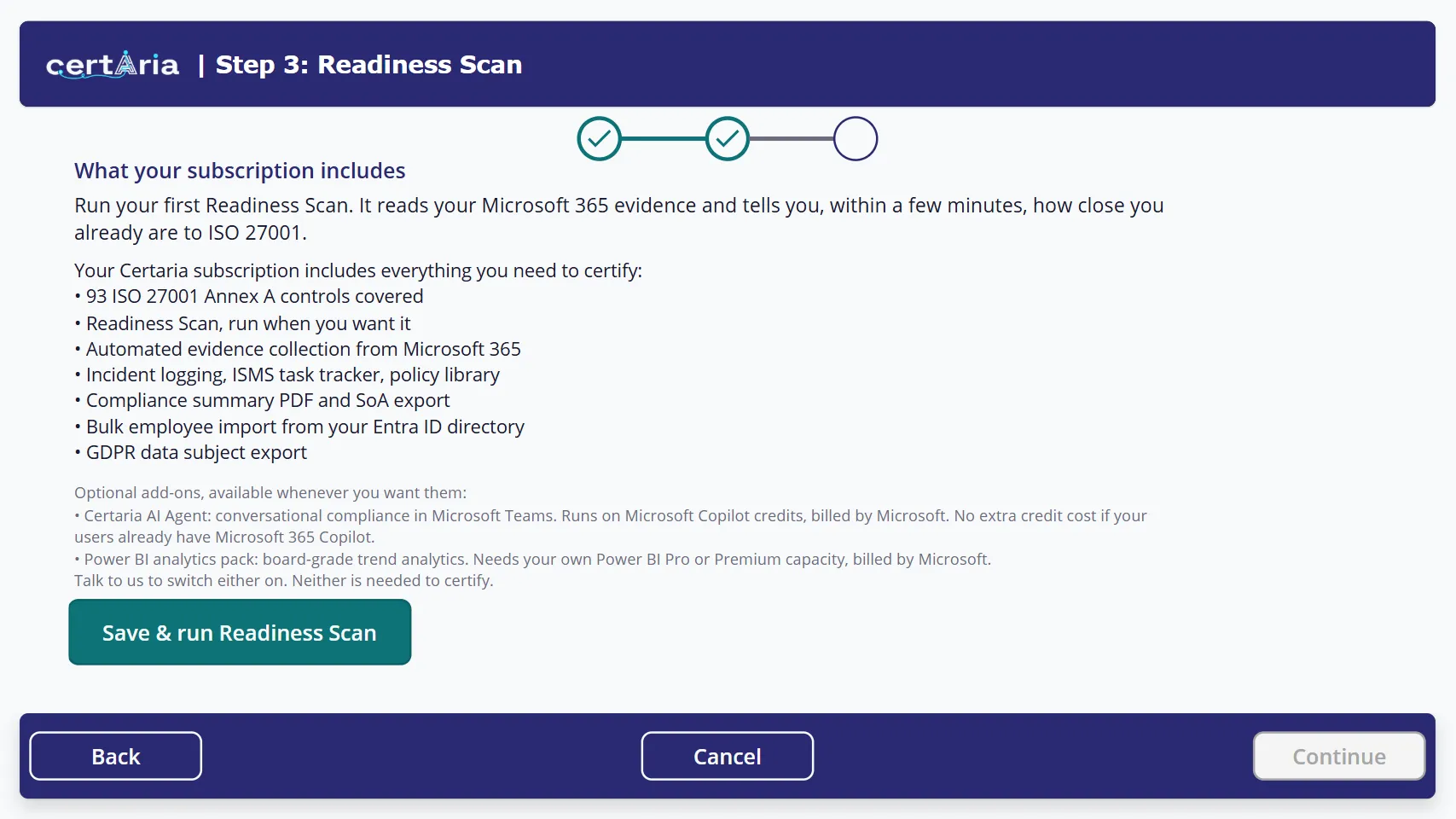 The wizard shows you this before your first scan, so the scope is clear before the numbers arrive.
Day 1: install and see where you stand
Section titled “Day 1: install and see where you stand”-
Install Certaria into your tenant. Your Global Administrator approves the install. Certaria deploys as a managed solution and your data stays in your own tenant throughout.
-
Grant Microsoft Graph consent. Certaria reads a small, fixed set of read only signals: Secure Score, device compliance, Conditional Access policy names, sensitivity labels and directory data. Your administrator approves them once. Nothing here gives Talastron standing access to anything.
-
Run the onboarding wizard. Three short steps, about fifteen minutes: your organisation profile, your SharePoint site, and your first Readiness Scan. Have your registered address and your ISMS administrator’s email to hand, because the wizard will not continue without them.
-
Read your first scan. The Readiness Scan grades you against the ISO 27001:2022 Annex A controls and reports how many are already evidenced by your existing Microsoft 365 configuration, how many are partial, and where the gaps are. Most organisations start with a substantial number already evidenced, before entering anything by hand.
Week 1: make it yours
Section titled “Week 1: make it yours”-
Work through your Statement of Applicability. For each Annex A control, record whether it applies to you and why. ISO 27001 requires this to be your own deliberate decision, and it is the first document your auditor reads. Certaria cannot make these decisions for you.
-
Adopt the policies that apply. Certaria ships template policies in a holding folder. Copy the ones you need into your live policy library, personalise them, and approve them. Adopt a template covers the holding folder and why it exists; Publish a document is the procedure itself.
-
Import your people. Bring your team in from Microsoft Entra ID in one go. Each person becomes trackable for acknowledgements and training records. A person without a linked user account receives nothing and appears in no reminder, so check this now rather than wondering later why a reminder never arrived.
Weeks 2 and 3: put it to work
Section titled “Weeks 2 and 3: put it to work”-
Let the acknowledgement loop run. Once a policy is approved and published, your people read it on your SharePoint site and confirm it on the Certaria card in Teams. They need no Power Platform licence to do either. The register builds itself and is your audit trail.
-
Assign the compliance tasks. Certaria generates Annex A tasks. Give them named owners and dates. Owners get a daily summary in Teams.
-
Start the registers. Risks, assets, incidents and the rest arrive empty on purpose. The registers you maintain explains what belongs in each and what an auditor expects to find.
Day 30: the rhythm
Section titled “Day 30: the rhythm”-
Compare a fresh scan against your baseline. Scans also run on a schedule, so your evidence history accumulates whether or not you remember to look.
-
Review the dashboard. Overdue actions, tasks due soon, risk by category, all from your own data.
-
Take a compliance summary. A snapshot of evidence coverage and control status, useful for a management review and later for your auditor.
Where this leads
Section titled “Where this leads”From here the work is steady rather than steep. Close the gaps the scan surfaces, keep the tasks moving, and let the evidence accumulate. How long it takes to reach audit readiness depends almost entirely on where you started, not on how fast you use Certaria.
- Run the onboarding wizard, if you have not already
- Publish a document, which is the first workflow you will repeat
- Troubleshooting, when something does not behave