

Troubleshooting
The failures administrators actually hit, what causes each one, and the fix. Grouped by where you were when it happened.
Audience: ISMS Admin.
How to use this: find the symptom, not the subsystem. Most Certaria failures are quiet rather than loud, so the entries below start from what you noticed.
Signing in and reaching the app
Section titled “Signing in and reaching the app”The app keeps showing a sign in screen, or sign in opens a blank window
Section titled “The app keeps showing a sign in screen, or sign in opens a blank window”Your browser is blocking the Microsoft sign in popup. Allow popups for apps.powerapps.com and make.powerapps.com, then reload.
Seeing a sign in screen once, immediately after Start setup in the onboarding wizard, is expected: the wizard reloads itself after first launch setup and the reload re authenticates.
”Power Apps licence not detected” during the wizard
Section titled “”Power Apps licence not detected” during the wizard”Usually accurate: the signed in account has no Power Apps licence. Assign a Power Apps Premium (per user), Pay-As-You-Go or Per App licence in the Microsoft 365 admin centre, then use Re-check licences. That re-checks the licence only and leaves your scan results alone.
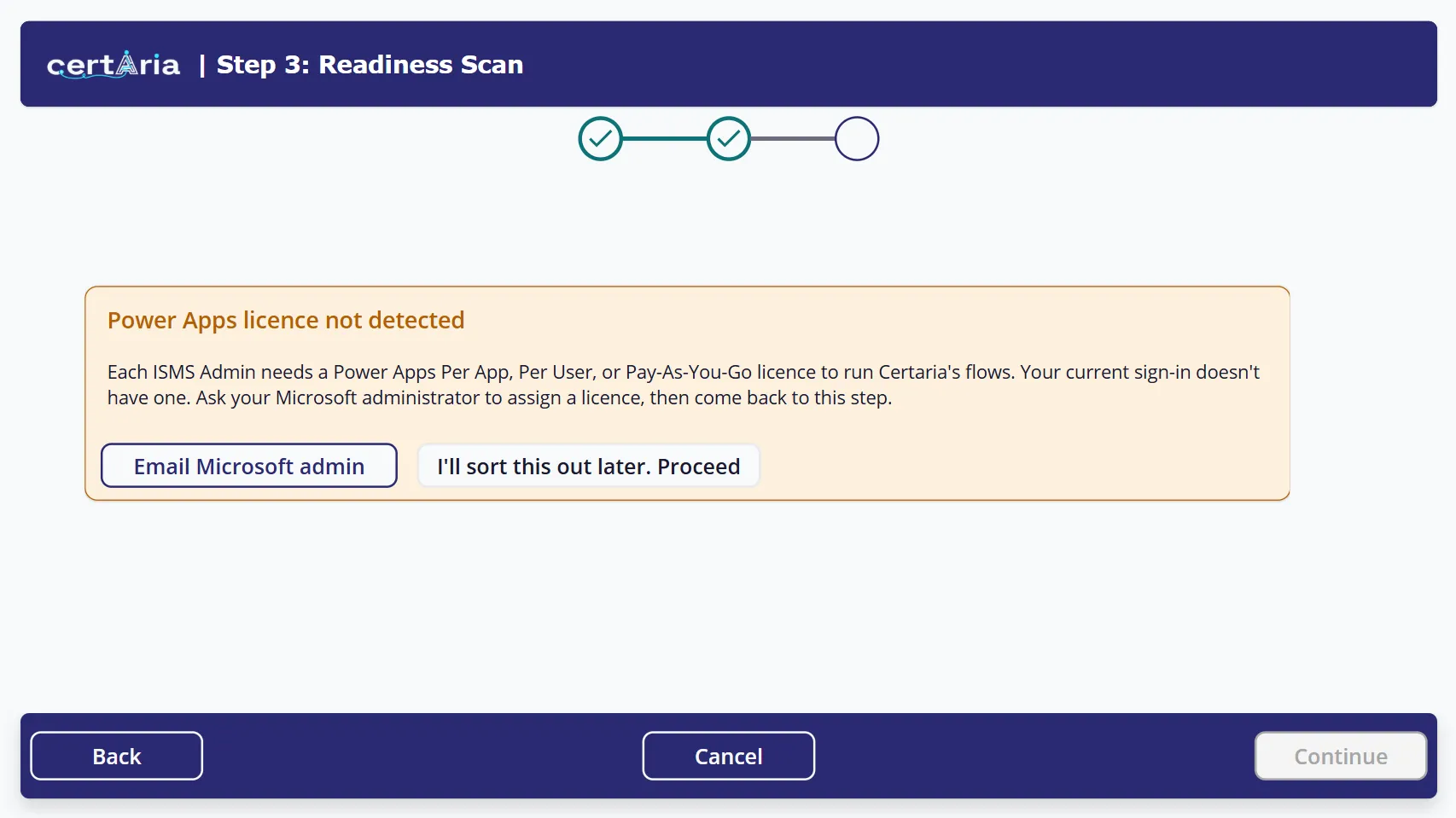 You can continue past this. Certaria records the gap rather than blocking setup, but the flows will not run until a licence is assigned.
I’ll sort this out later. Proceed does exactly what it says: onboarding continues and the licence stays unassigned. Take it if the person running the wizard is not the person who can assign licences, then come back.
Only ISMS administrators need this licence. Everyone else uses Certaria through SharePoint and Teams.
Policies
Section titled “Policies”A document record never appeared for a file I added
Section titled “A document record never appeared for a file I added”Certaria creates the record for you, within ten minutes, for files in the root of your policy library. Two causes:
- The file is not in the root of Policy Masters. Certaria publishes from the root only. Move it back there.
- Fewer than ten minutes have passed. The sweep runs every ten minutes.
You can always create the record by hand with + New if you do not want to wait.
The policy is Approved but my people cannot see it
Section titled “The policy is Approved but my people cannot see it”Check the run report of Certaria: Publish Policies to Site for a list named approvedButNotPublished. If your document is on it, Certaria cannot find its file in the root of Policy Masters.
This refusal is deliberate. Publishing an unpersonalised template would put a document full of placeholders in front of your organisation and collect acknowledgements against it, which is worse at audit than no acknowledgements at all.
Other causes: the category is an excluded type (Template, Register or Report), or fewer than ten minutes have passed.
The link opens a template with placeholders still in it
Section titled “The link opens a template with placeholders still in it”The document was approved before it was personalised. Personalise the file in Policy Masters and let the next run rebuild the reading page.
Two document records share one Doc Ref
Section titled “Two document records share one Doc Ref”Releases before August 2026 could register the same file twice, once when it was adopted and again when the register sweep failed to recognise it. Both records satisfy the publish gate, so the document ends up with two reading pages.
Decide which record is right, set the other to Archived, and check the acknowledgements are attached to the one you keep. Adopting a template no longer creates a second record for a reference the register already holds.
Duplicate document records for the same file
Section titled “Duplicate document records for the same file”The file was renamed after its record was created. Certaria matches on file name, so copying or moving a file between folders is safe but renaming it is not. Delete the surplus Draft record.
A new version was published but nobody was re-prompted
Section titled “A new version was published but nobody was re-prompted”Either the version field was not changed, or the affected people have no linked user accounts. Confirm the version actually changed, then check the people register.
Notifications
Section titled “Notifications”Nobody is receiving Teams messages
Section titled “Nobody is receiving Teams messages”- Check the posting account. If the account that posts Teams messages was left blank during setup, there is nothing to post from. Set it on the wizard’s Step 3 screen.
- Check the hours. The reminder hours you set during onboarding are in UTC. A reminder set for 09:00 arrives at 10:00 UK time during British Summer Time. Certaria’s own built-in schedules, such as the daily evidence scan and the overdue check, follow the UK clock instead and do not shift.
- Check the people register. A person with no linked user account, or no email address, receives nothing and produces no error.
One person receives nothing while everyone else does
Section titled “One person receives nothing while everyone else does”Almost always the third cause above. It fails silently by design: there is no one to send an error to.
Someone acknowledged but is still being reminded
Section titled “Someone acknowledged but is still being reminded”A confirmation on the card is recorded immediately, but only for the documents they ticked. The usual causes: they pressed Confirm without ticking anything, or they answered a card that had already expired. Ask them to tick and confirm on the next day’s card. If it persists, confirm the acknowledgement was recorded against the person you expect.
The Readiness Scan
Section titled “The Readiness Scan”Email: “Readiness Scan completed with errors”
Section titled “Email: “Readiness Scan completed with errors””The scan checks several Microsoft 365 data sources. If one fails, it still completes, writes evidence for everything that succeeded, keeps the previous evidence for the failed source, and emails you naming exactly what failed.
- Read the error line. It names the data source, for example
Sensitivity Labels: Failed. - The usual cause is a missing Microsoft Graph permission. The app registration lacks the permission for that data source, or consent was granted for the wrong type. Ask your Global Administrator to confirm the permission exists under Application permissions, not Delegated, with admin consent granted. See Graph consent.
- Re-run the scan. A clean run sends no email.
The scan reports fewer controls evidenced than last time
Section titled “The scan reports fewer controls evidenced than last time”Check whether a data source failed in the meantime. Certaria keeps the previous evidence for a failed source rather than discarding it, so a drop usually means something genuinely changed in your tenant.
After installation
Section titled “After installation”A workflow shows as Off in the solution
Section titled “A workflow shows as Off in the solution”First launch setup switches Certaria’s workflows on. If one remains off, it is usually a transient activation failure: turn it on in the solution’s cloud flows list. If it refuses with an error naming a connection, that connection needs signing in first.
Excel export shows column names like oda_riskname
Section titled “Excel export shows column names like oda_riskname”You exported a dynamic worksheet. Re-export choosing Static worksheet, which uses display names and is what an auditor should receive. See Exporting your data.
The registers are all empty
Section titled “The registers are all empty”Expected. Four registers arrive empty and stay empty until you fill them in. The registers you maintain explains what belongs in each. An empty table looks identical to a broken one, which is why that guide exists.
Frequently asked
Section titled “Frequently asked”| Question | Answer |
|---|---|
| Does Certaria change anything in my Microsoft 365 configuration? | No. Every Graph permission it holds is read only. It reads evidence and never writes to your tenant configuration. |
| Can I re-run the onboarding wizard? | Yes. Every step verifies rather than duplicates. Re-running is the recommended fix after resolving a failure. |
| Where is my data? | In your own Microsoft 365 tenant: Dataverse for records, your SharePoint site for documents. Talastron has no standing access. |
| Do my staff need a licence? | No. Only ISMS administrators need a Power Apps licence, and Power Apps Premium (per user), Pay-As-You-Go or Per App (through a Microsoft CSP partner) all work. Everyone else reads and acknowledges policies in SharePoint. |
| What can the agent not answer? | Anything outside your ISMS data and its ISO 27001 knowledge base. It gives no legal advice and no certification verdicts. |
Still stuck
Section titled “Still stuck”Contact your Certaria contact with the exact error text and roughly when it happened. The run reports on the scheduled flows are the fastest way to see what Certaria thought it was doing.